Blog The Social Home team
Spaces keep talking while the host sleeps
The GFS path catches up with direct federation and the mesh. Space members now publish straight through the GFS with writer certificates, can post anonymously in strict mode, and private spaces get an opaque channel. All in Social Home 2026.10.4.
Every space in Social Home lives on one household: its host. Between paired households, that was never a bottleneck. Posts travel directly from one home to the other, or hop across the mesh of households you both know, and the host doesn’t need to be awake for any of it.
The path through the GFS (Global Federation Server) — the relay that helps households find each other — was different. It carries a space to households you aren’t paired with: followers of a global space, or members who joined a private space through a link. On that path, the host had to sign and relay every post. If the host’s server was rebooting, updating or simply offline, the space went quiet for everyone who reached it through the GFS.
Not anymore. With Social Home 2026.10.4, members publish their own posts, comments and reactions straight through the GFS, and the host no longer has to be online. The GFS path now works the way direct federation and the mesh always have. It took five pull requests and a lot of protocol work, and we couldn’t be happier with how it turned out. And the GFS still never sees what anyone posts.
Everything in this post is about the GFS path only. Direct household-to-household federation and the mesh are unchanged.
Members post for themselves
When a household gets write rights in a space, it now gets a small, signed permission slip from the space along with them. From then on it posts straight through the GFS on its own; the GFS checks the slip and passes the sealed post on to everyone following the space. The host is not in the loop any more.
The GFS still sees nothing it can read. It can’t tell a post from a comment or a reaction — they all arrive as sealed envelopes of the same few sizes. Lose your write rights (removed, banned, left, or narrowed to comments only) and your slip stops working at the same moment. Households on older versions keep getting every post, because the host keeps relaying as before and receivers simply drop the duplicates.
Under the hood
The permission slip is a writer certificate: the space’s
authority key signs {space, key epoch, household key, scope} with
scope write or comment — one Ed25519 signature per writer
household per epoch, never one per post. A member attaches the
certificate and publishes directly; the GFS verifies it against the
space key it has pinned, then fans the item out to followers as a
generic space_item plus ciphertext. Payloads are padded to fixed
size buckets (1, 4, 16, 64 and 128 KiB), so a reaction and a post
look alike. Losing write rights rotates the key epoch, which
invalidates the old certificate. Comments, reactions, edits and
deletes travel the same way and may arrive in any order: a delete
that arrives before its post still wins, and edits resolve by the
author-signed edit time.
Trusted or strict: the owner decides
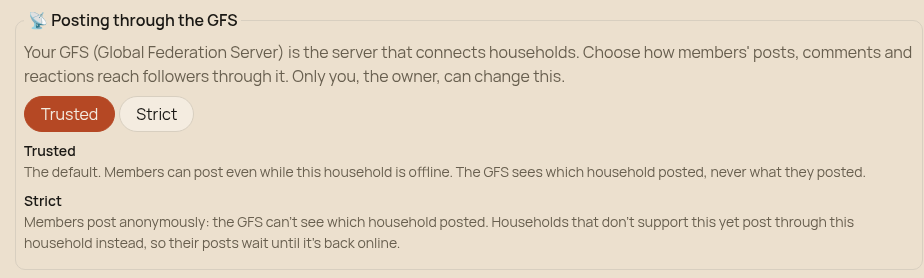
The space owner chooses what the GFS may learn about who is posting.
- Trusted (the default): the GFS sees which household posted, never what.
- Strict: members post anonymously. The GFS can’t tell which household a post came from — and can’t even tell which households are allowed to write.
Under the hood
In strict mode all writers share a per-epoch writer key derived from the space seed. A publish carries no household id and no household signature; the writer certificate rides inside the ciphertext. Writers subscribe in the same shuffled batch as followers, so the GFS can’t separate writers from readers.
Private spaces can use the GFS too
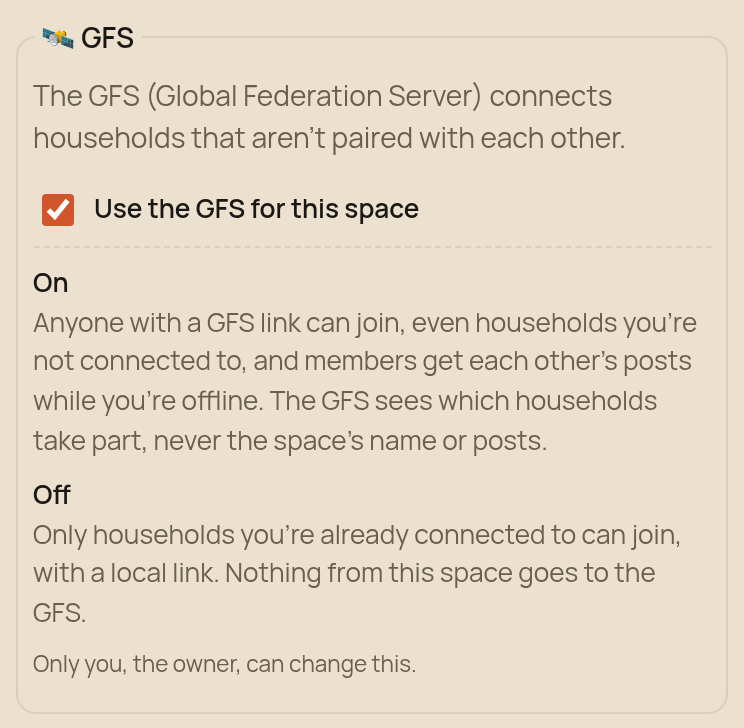
A private space normally never touches the GFS: its members are households you’re paired with, and they reach each other directly or over the mesh. Now the owner can switch the GFS on for a private space. It’s off by default. When it’s on, anyone with a GFS link can join without pairing first, and members who are only reachable through the GFS get each other’s posts while the host is offline.
Even then, the GFS never learns which space it is carrying — not its name, not its key, not what’s in it. It only learns which households take part.
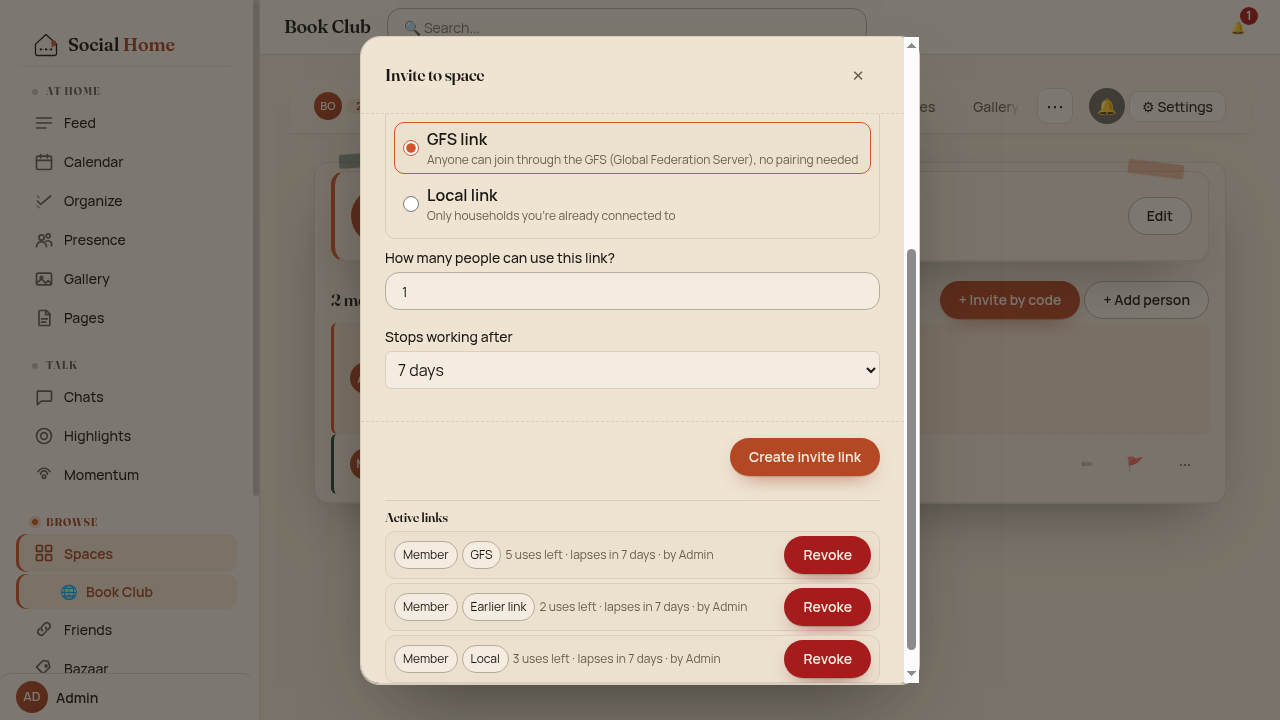
Nobody gets cut off by accident. While households that joined through a GFS link are still in the space, turning the GFS off is refused, and the settings list exactly which households to remove first. Every invite link now shows its type: a GFS link for anyone, or a Local link that only works for households you’re already connected to and never touches the GFS.
Under the hood
A private space with the GFS on is represented on the relay by a random 128-bit channel id with its own key, derived with HKDF so it can’t be linked back to the space key. The GFS sees the member households on that channel, never the space’s id, name, key or content.
The GFS learns less than ever
While we were in there, we made the GFS see less across the board:
- A space sync tells the GFS nothing. Syncing a space directly with another household no longer involves the GFS at all, so there is no record of who synced when.
- The GFS never learns who relayed. Space events go out without any household identity attached.
- Invite-link traffic is padded. The GFS sees a rough size, never the exact one.
- Outages don’t lose events. If the GFS hiccups, your household keeps trying. Messages to members who are briefly unreachable are held and sent as soon as they’re back.
Under the hood
Direct syncs used to ask the GFS for a signalling node nobody used;
that call is gone. The old identified publish is removed: space
events go out as {space_id, event_type, payload} on a cookie-less
session with no household id. Envelopes to members who joined by
link are padded to size buckets. Publishes that hit a GFS error are
retried with backoff (5 s, 30 s, 2 min, 10 min), and the GFS queues
frames for offline recipients for up to 24 hours.
Connect during onboarding
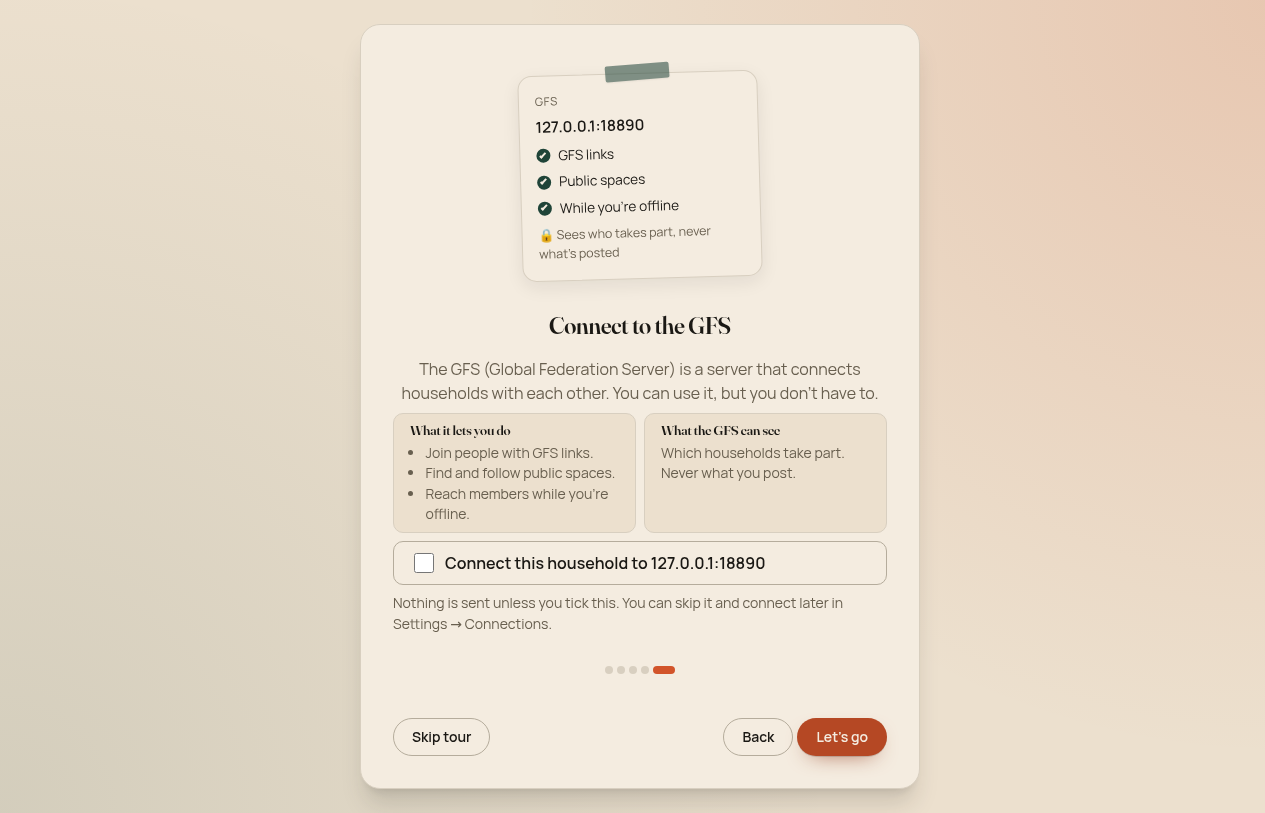
The last step of the welcome tour now offers to connect your household to the Social Home GFS. The box is unchecked, so nothing is sent unless you tick it. It says in plain words what the GFS lets you do and what it can see, and the app checks that it really is the Social Home GFS before connecting.
Try it
All of this is in Social Home 2026.10.4. Older households keep working: on the GFS path they simply fall back to the host until they update, and direct federation is untouched either way. Curious how the GFS fits in? Read Global spaces, or run a GFS yourself.